
UPS主要功能就是保护硬盘数据,要知道硬盘有价数据无价,科学家曾做过实验,硬盘再使用半年后,其数据价值既已超过硬盘价值。因此配备一台UPS很有必要。UPS主要分为2种,一种为后背式(民用廉价版),一种为在线式(土豪金版)。原理就不再科普了,当然不管那种,越贵越好。选择起来也主要看功率,小了过载不工作,大了换电池维护成本高。
像我这种大国P民也只能拥有廉价版,至少都能满足需要,我这边用的是APC BK650,一台廉价版后背UPS,只有一个RJ45转USB的数据线,实际就是只有USB功能。我是安装在esxi6.5系统上,具体可以看我上一篇文章ESXi 6.5 使用NUT Client连接群晖UPS服务器
但是呢只能安装一个黑群晖来做UPS服务器(还需要一台ikuai做虚拟路由器来实现黑裙到EXSI6.5的监测-其实不用ikuai也行,用ikuai可以保护esxi中的其他虚拟机),如果你有另外一台白群晖,完全可以按照文章来设置。下面讲讲树莓派安装UPS服务器,这样ESXI就可以直接访问树莓派中的UPS服务器了,还可以添加一个显示屏用于显示UPS状态。
实际我们还是用的Network UPS Tools,只是把安装到黑群晖的功能安装到树莓派上。下面是安装方法:
准备工作
- Raspberry Pi Model B / B+ / 2B,其中(Model A / A+ 须加上USB有线/无线网卡)
- Raspbian 系统。
- UPS监控端口最好是USB或RJ-45,这次是用APC Bk650。
- 如果是Serial Port(RS-232)也不是不可以,只要利用支持Linux的USB 转 RS-232转接线即可。
UPS服务端安装与设定
1、安装Network UPS Tools套件
可以从这里查询支持的UPS我们主要使用下面的参数就行。
- Manufacturer – 品牌(这里根据我的选择APC)
- Model -型号(这里根据我的选择Back-UPS USB)
- Connection – 连线方式,Serial、USB、Network。
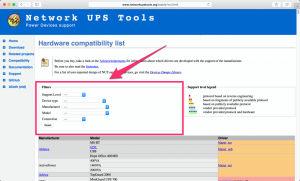
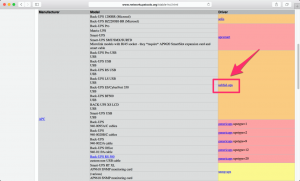
这样我们就能找到我们的端口设置参数了。
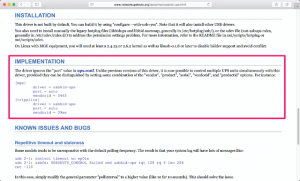
安装UPS服务软件
sudo apt-get -y install nut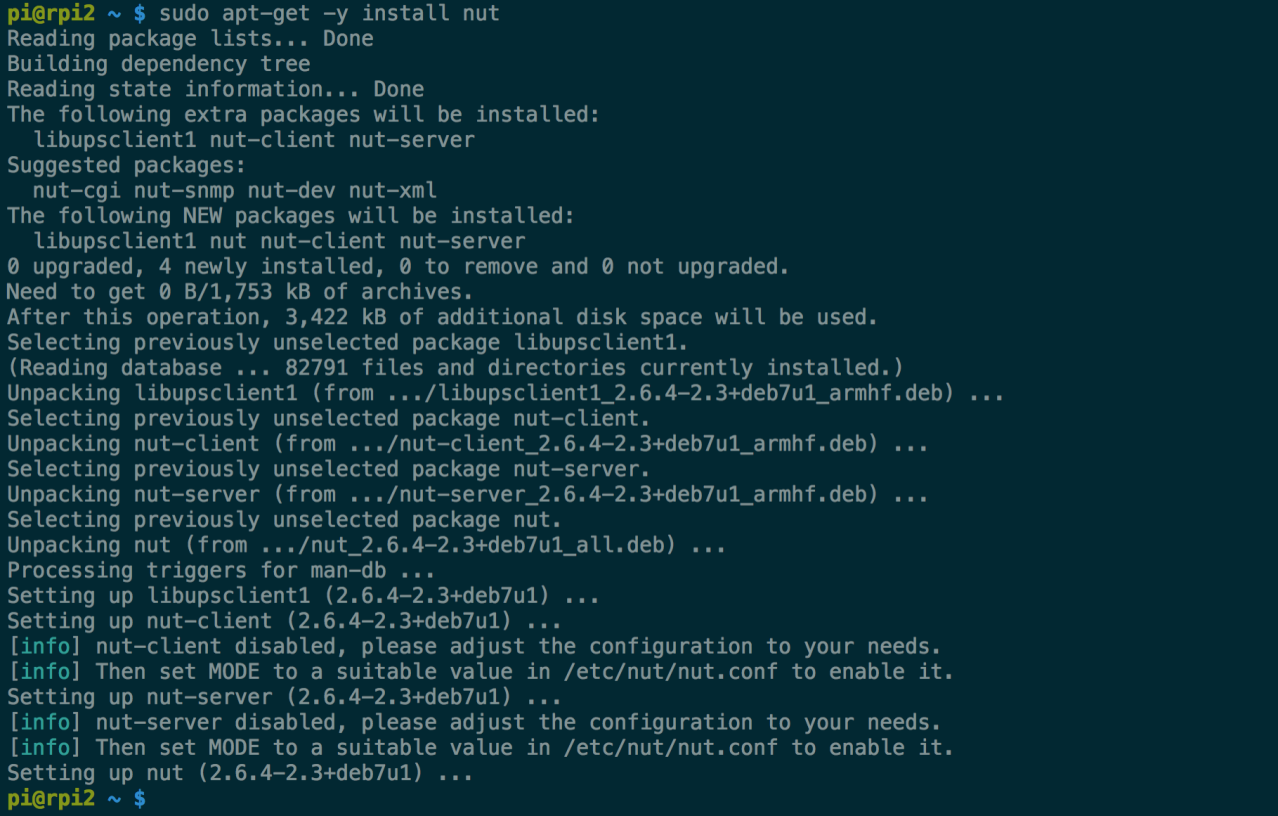
2、编辑UPS配置文件
sudo vi /etc/nut/ups.conf将刚刚查询到的驱动参数设定值,写入配置文件里,中括弧[apc]是自订的UPS名称,接下来的步骤会用到,desc="xxx"只是注解可省略。下面是我的配置文件
# Network UPS Tools: example ups.conf
#
# --- SECURITY NOTE ---
#
# If you use snmp-ups and set a community string in here, you
# will have to secure this file to keep other users from obtaining
# that string.  It needs to be readable by upsdrvctl and any drivers,
# and by upsd.
#
# ---
#
# This is where you configure all the UPSes that this system will be
# monitoring directly.  These are usually attached to serial ports, but
# USB devices and SNMP devices are also supported.
#
# This file is used by upsdrvctl to start and stop your driver(s), and
# is also used by upsd to determine which drivers to monitor.  The
# drivers themselves also read this file for configuration directives.
#
# The general form is:
#
# [upsname]
#       driver = <drivername>
#         port = <portname>
#   < any other directives here >
#
# The section header ([upsname]) can be just about anything as long as
# it is a single word inside brackets.  upsd uses this to uniquely
# identify a UPS on this system.
#
# If you have a UPS called snoopy, your section header would be "[snoopy]".
# On a system called "doghouse", the line in your upsmon.conf to monitor
# it would look something like this:
#
#   MONITOR snoopy@doghouse 1 upsmonuser mypassword master
#
# It might look like this if monitoring in slave mode:
#
#   MONITOR snoopy@doghouse 1 upsmonuser mypassword slave
#
# Configuration directives
# ------------------------
#
# These directives are used by upsdrvctl only and should be specified outside
# of a driver definition:
#
#    maxretry: Optional.  Specify the number of attempts to start the driver(s),
#              in case of failure, before giving up. A delay of 'retrydelay' is
#              inserted between each attempt. Caution should be taken when using
#              this option, since it can impact the time taken by your system to
#              start.
#
#              The default is 1 attempt.
#
#  retrydelay: Optional.  Specify the delay between each restart attempt of the
#              driver(s), as specified by 'maxretry'. Caution should be taken
#              when using this option, since it can impact the time taken by your
#              system to start.
#
#              The default is 5 seconds.
#
# These directives are common to all drivers that support ups.conf:
#
#  driver: REQUIRED.  Specify the program to run to talk to this UPS.
#          apcsmart, bestups, and sec are some examples.
#
#    port: REQUIRED.  The serial port where your UPS is connected.
#          /dev/ttyS0 is usually the first port on Linux boxes, for example.
#
# sdorder: optional.  When you have multiple UPSes on your system, you
#          usually need to turn them off in a certain order.  upsdrvctl
#          shuts down all the 0s, then the 1s, 2s, and so on.  To exclude
#          a UPS from the shutdown sequence, set this to -1.
#
#          The default value for this parameter is 0.
#
#  nolock: optional, and not recommended for use in this file.
#
#          If you put nolock in here, the driver will not lock the
#          serial port every time it starts.  This may allow other
#          processes to seize the port if you start more than one by
#          mistake.
#
#          This is only intended to be used on systems where locking
#          absolutely must be disabled for the software to work.
#
# maxstartdelay: optional.  This can be set as a global variable
#                above your first UPS definition and it can also be
#                set in a UPS section.  This value controls how long
#                upsdrvctl will wait for the driver to finish starting.
#                This keeps your system from getting stuck due to a
#                broken driver or UPS.
#
#                The default is 45 seconds.
#
# synchronous: optional.  The driver work by default in asynchronous
#              mode (i.e *synchronous=no*).  This means that all data
#              are pushed by the driver on the communication socket to
#              upsd (Unix socket on Unix, Named pipe on Windows) without
#              waiting for these data to be actually consumed.  With
#              some HW, such as ePDUs, that can produce a lot of data,
#              asynchronous mode may cause some congestion, resulting in
#              the socket to be full, and the driver to appear as not
#              connected.  By enabling the 'synchronous' flag
#              (value = 'yes'), the driver will wait for data to be
#              consumed by upsd, prior to publishing more.  This can be
#              enabled either globally or per driver.
#
#              The default is 'no' (i.e. asynchronous mode) for backward
#              compatibility of the driver behavior.
#
# Anything else is passed through to the hardware-specific part of
# the driver.
#
# Examples
# --------
#
# A simple example for a UPS called "powerpal" that uses the blazer_ser
# driver on /dev/ttyS0 is:
#
# [powerpal]
#   driver = blazer_ser
#   port = /dev/ttyS0
#   desc = "Web server"
#
# If your UPS driver requires additional settings, you can specify them
# here.  For example, if it supports a setting of "1234" for the
# variable "cable", it would look like this:
#
# [myups]
#   driver = mydriver
#   port = /dev/ttyS1
#   cable = 1234
#   desc = "Something descriptive"
#
# To find out if your driver supports any extra settings, start it with
# the -h option and/or read the driver's documentation.
[apc]
       driver = usbhid-ups
       port = auto
       desc = "APC BK650 UPS"
# Set maxretry to 3 by default, this should mitigate race with slow devices:
#maxretry = 3
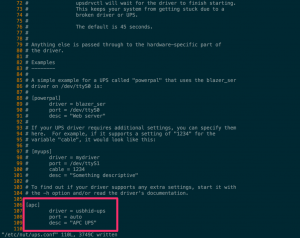
看到了吧,有用的只有后面那几行
[apc]
       driver = usbhid-ups
       port = auto
       desc = "APC BK650 UPS"
3、启动UPS服务
sudo upsdrvctl start
4、编辑运行模式配置
sudo vi /etc/nut/nut.conf将「MODE=none」改成「MODE=netserver」
下面是我的配置(最后一行)
# Network UPS Tools: example nut.conf
#
##############################################################################
# General section
##############################################################################
# The MODE determines which part of the NUT is to be started, and which
# configuration files must be modified.
#
# This file try to standardize the various files being found in the field, like
# /etc/default/nut on Debian based systems, /etc/sysconfig/ups on RedHat based
# systems, ... Distribution's init script should source this file to see which
# component(s) has to be started.
#
# The values of MODE can be:
# - none: NUT is not configured, or use the Integrated Power Management, or use
#   some external system to startup NUT components. So nothing is to be started.
# - standalone: This mode address a local only configuration, with 1 UPS
#   protecting the local system. This implies to start the 3 NUT layers (driver,
#   upsd and upsmon) and the matching configuration files. This mode can also
#   address UPS redundancy.
# - netserver: same as for the standalone configuration, but also need
#   some more network access controls (firewall, tcp-wrappers) and possibly a
#   specific LISTEN directive in upsd.conf.
#   Since this MODE is opened to the network, a special care should be applied
#   to security concerns.
# - netclient: this mode only requires upsmon.
#
# IMPORTANT NOTE:
#  This file is intended to be sourced by shell scripts.
#  You MUST NOT use spaces around the equal sign!

#MODE=none
MODE=netserver
5、添加允许接入的网络
查询本机所有的IP位址,这里只加入IPv4的位址。
ifconfig | grep inet[^6]
5.1编辑UPS Daemon监听配置文件
sudo vi /etc/nut/upsd.conf找到「# LISTEN <address> [<port>]」,在下一行加入你的所有IP位址,连接端口3493不用改。
下面这些都要改成你的树莓派局域网端口,127.0.0.1不要动。
LISTEN 127.0.0.1 3493
LISTEN 192.16.31.2 3493
LISTEN 192.168.1.15 3493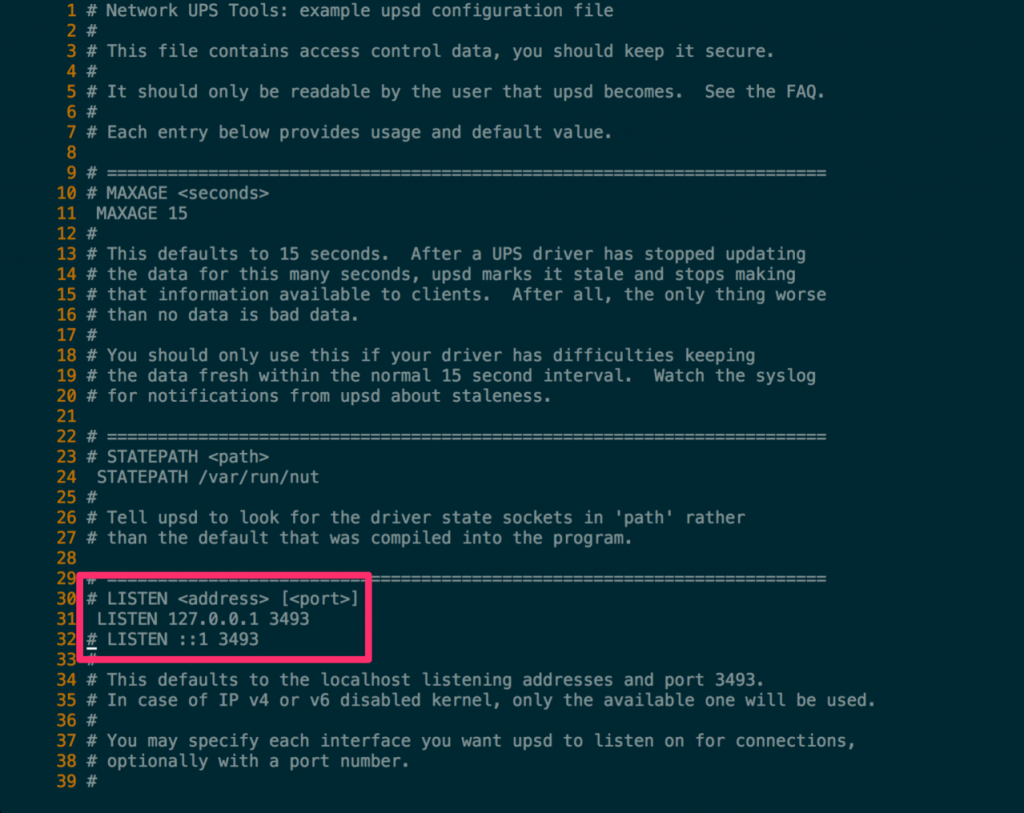
我的配置文件
# Network UPS Tools: example upsd configuration file
#
# This file contains access control data, you should keep it secure.
#
# It should only be readable by the user that upsd becomes.  See the FAQ.
#
# Each entry below provides usage and default value.

# =======================================================================
# MAXAGE <seconds>
# MAXAGE 15
#
# This defaults to 15 seconds.  After a UPS driver has stopped updating
# the data for this many seconds, upsd marks it stale and stops making
# that information available to clients.  After all, the only thing worse
# than no data is bad data.
#
# You should only use this if your driver has difficulties keeping
# the data fresh within the normal 15 second interval.  Watch the syslog
# for notifications from upsd about staleness.

# =======================================================================
# STATEPATH <path>
# STATEPATH /var/run/nut
#
# Tell upsd to look for the driver state sockets in 'path' rather
# than the default that was compiled into the program.

# =======================================================================
# LISTEN <address> [<port>]
# LISTEN 127.0.0.1 3493
# LISTEN ::1 3493
LISTEN 127.0.0.1 3493
LISTEN 192.168.31.2 3493
#
# This defaults to the localhost listening addresses and port 3493.
# In case of IP v4 or v6 disabled kernel, only the available one will be used.
#
# You may specify each interface you want upsd to listen on for connections,
# optionally with a port number.
#
# You may need this if you have multiple interfaces on your machine and
# you don't want upsd to listen to all interfaces (for instance on a
# firewall, you may not want to listen to the external interface).
#
# This will only be read at startup of upsd.  If you make changes here,
# you'll need to restart upsd, reload will have no effect.

# =======================================================================
# MAXCONN <connections>
# MAXCONN 1024
#
# This defaults to maximum number allowed on your system.  Each UPS, each
# LISTEN address and each client count as one connection.  If the server
# runs out of connections, it will no longer accept new incoming client
# connections.  Only set this if you know exactly what you're doing.

# =======================================================================
# CERTFILE <certificate file>
# CERTFILE /usr/local/ups/etc/upsd.pem
#
# When compiled with SSL support with OpenSSL backend,
# you can enter the certificate file here.
# The certificates must be in PEM format and must be sorted starting with
# the subject's certificate (server certificate), followed by intermediate
# CA certificates (if applicable_ and the highest level (root) CA. It should
# end with the server key. See 'docs/security.txt' or the Security chapter of
# NUT user manual for more information on the SSL support in NUT.
#
# See 'docs/security.txt' or the Security chapter of NUT user manual
# for more information on the SSL support in NUT.

# =======================================================================
# CERTPATH <certificate file or directory>
# CERTPATH /usr/local/ups/etc/cert/upsd
#
# When compiled with SSL support with NSS backend,
# you can enter the certificate path here.
# Certificates are stored in a dedicated database (splitted in 3 files).
# Specify the path of the database directory.
#
# See 'docs/security.txt' or the Security chapter of NUT user manual
# for more information on the SSL support in NUT.

# =======================================================================
# CERTIDENT <certificate name> <database password>
# CERTIDENT "my nut server" "MyPasSw0rD"
#
# When compiled with SSL support with NSS backend,
# you can specify the certificate name to retrieve from database to
# authenticate itself and the password
# required to access certificate related private key.
#
# See 'docs/security.txt' or the Security chapter of NUT user manual
# for more information on the SSL support in NUT.

# =======================================================================
# CERTREQUEST <certificate request level>
# CERTREQUEST REQUIRE
#
# When compiled with SSL support with NSS backend and client certificate
# validation (disabled by default, see 'docs/security.txt'),
# you can specify if upsd requests or requires client's' certificates.
# Possible values are :
#  - 0 to not request to clients to provide any certificate
#  - 1 to require to all clients a certificate
#  - 2 to require to all clients a valid certificate
#
# See 'docs/security.txt' or the Security chapter of NUT user manual
# for more information on the SSL support in NUT.
6、编辑UPS用户配置
sudo vi /etc/nut/upsd.users新增一个管理者帐号,「[admin]」是自订的帐号名称,你可以自己设置,「password=」是密码。
再新增一个UPS主控端「[upsmon]」,「password=」是自订密码。
# Network UPS Tools: Example upsd.users
#
# This file sets the permissions for upsd - the UPS network daemon.
# Users are defined here, are given passwords, and their privileges are
# controlled here too.  Since this file will contain passwords, keep it
# secure, with only enough permissions for upsd to read it.

# --------------------------------------------------------------------------

# Each user gets a section.  To start a section, put the username in
# brackets on a line by itself.  To set something for that user, specify
# it under that section heading.  The username is case-sensitive, so
# admin and AdMiN are two different users.
#
# Possible settings:
#
# password: The user's password.  This is case-sensitive.
#
# --------------------------------------------------------------------------
#
# actions: Let the user do certain things with upsd.
#
# Valid actions are:
#
# SET   - change the value of certain variables in the UPS
# FSD   - set the "forced shutdown" flag in the UPS
#
# --------------------------------------------------------------------------
#
# instcmds: Let the user initiate specific instant commands.  Use "ALL"
# to grant all commands automatically.  There are many possible
# commands, so use 'upscmd -l' to see what your hardware supports.  Here
# are a few examples:
#
# test.panel.start  - Start a front panel test
# test.battery.start    - Start battery test
# test.battery.stop - Stop battery test
# calibrate.start   - Start calibration
# calibrate.stop    - Stop calibration
#
# --------------------------------------------------------------------------
#
# Example:
#
#   [admin]
#       password = mypass
#       actions = SET
#       instcmds = ALL
#
[admin]
        password = admin
        actions = SET
        instcmds = ALL
[upsmon]
        password = upsmon-pw
        upsmon master
#
# --- Configuring for a user who can execute tests only
#
#   [testuser]
#       password  = pass
#       instcmds  = test.battery.start
#       instcmds  = test.battery.stop

#
# --- Configuring for upsmon
#
# To add a user for your upsmon, use this example:
#
#   [upsmon]
#       password  = pass
#       upsmon master
# or
#       upsmon slave
#
# The matching MONITOR line in your upsmon.conf would look like this:
#
# MONITOR myups@localhost 1 upsmon pass master  (or slave)
7、编辑UPS监控程序配置
加入下列设定值,「apc」是ups.conf 的UPS 名称,「localhost」是本机的IP 位址,「upsmon」是upsd.users 的主控端名称,「upsmon-pw」是主控端的密码,「master」代表这台是主控端。
MONITOR apc@localhost 1 upsmon upsmon-pw master
sudo vi /etc/nut/upsmon.conf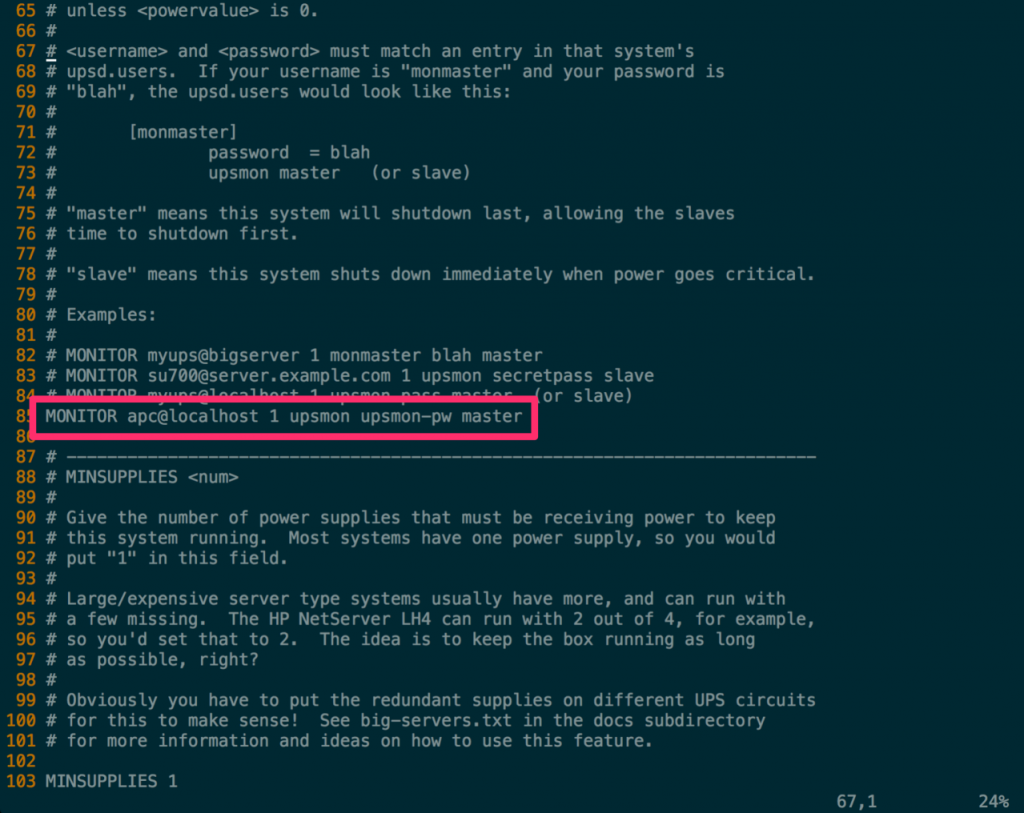
# Network UPS Tools: example upsmon configuration
#
# This file contains passwords, so keep it secure.

# --------------------------------------------------------------------------
# RUN_AS_USER <userid>
#
# By default, upsmon splits into two processes.  One stays as root and
# waits to run the SHUTDOWNCMD.  The other one switches to another userid
# and does everything else.
#
# The default nonprivileged user is set at compile-time with
#   'configure --with-user=...'.
#
# You can override it with '-u <user>' when starting upsmon, or just
# define it here for convenience.
#
# Note: if you plan to use the reload feature, this file (upsmon.conf)
# must be readable by this user!  Since it contains passwords, DO NOT
# make it world-readable.  Also, do not make it writable by the upsmon
# user, since it creates an opportunity for an attack by changing the
# SHUTDOWNCMD to something malicious.
#
# For best results, you should create a new normal user like "nutmon",
# and make it a member of a "nut" group or similar.  Then specify it
# here and grant read access to the upsmon.conf for that group.
#
# This user should not have write access to upsmon.conf.
#
# RUN_AS_USER nut

# --------------------------------------------------------------------------
# MONITOR <system> <powervalue> <username> <password> ("master"|"slave")
#
# List systems you want to monitor.  Not all of these may supply power
# to the system running upsmon, but if you want to watch it, it has to
# be in this section.
#
# You must have at least one of these declared.
#
# <system> is a UPS identifier in the form <upsname>@<hostname>[:<port>]
# like ups@localhost, su700@mybox, etc.
#
# Examples:
#
#  - "su700@mybox" means a UPS called "su700" on a system called "mybox"
#
#  - "fenton@bigbox:5678" is a UPS called "fenton" on a system called
#    "bigbox" which runs upsd on port "5678".
#
# The UPS names like "su700" and "fenton" are set in your ups.conf
# in [brackets] which identify a section for a particular driver.
#
# If the ups.conf on host "doghouse" has a section called "snoopy", the
# identifier for it would be "snoopy@doghouse".
#
# <powervalue> is an integer - the number of power supplies that this UPS
# feeds on this system.  Most computers only have one power supply, so this
# is normally set to 1.  You need a pretty big or special box to have any
# other value here.
#
# You can also set this to 0 for a system that doesn't supply any power,
# but you still want to monitor.  Use this when you want to hear about
# changes for a given UPS without shutting down when it goes critical,
# unless <powervalue> is 0.
#
# <username> and <password> must match an entry in that system's
# upsd.users.  If your username is "monmaster" and your password is
# "blah", the upsd.users would look like this:
#
#   [monmaster]
#       password  = blah
#       upsmon master   (or slave)
#
# "master" means this system will shutdown last, allowing the slaves
# time to shutdown first.
#
# "slave" means this system shuts down immediately when power goes critical.
#
# Examples:
#
# MONITOR myups@bigserver 1 monmaster blah master
# MONITOR su700@server.example.com 1 upsmon secretpass slave
# MONITOR myups@localhost 1 upsmon pass master  (or slave)
MONITOR apc@localhost 1 upsmon upsmon-pw master
# --------------------------------------------------------------------------
# MINSUPPLIES <num>
#
# Give the number of power supplies that must be receiving power to keep
# this system running.  Most systems have one power supply, so you would
# put "1" in this field.
#
# Large/expensive server type systems usually have more, and can run with
# a few missing.  The HP NetServer LH4 can run with 2 out of 4, for example,
# so you'd set that to 2.  The idea is to keep the box running as long
# as possible, right?
#
# Obviously you have to put the redundant supplies on different UPS circuits
# for this to make sense!  See big-servers.txt in the docs subdirectory
# for more information and ideas on how to use this feature.

MINSUPPLIES 1

# --------------------------------------------------------------------------
# SHUTDOWNCMD "<command>"
#
# upsmon runs this command when the system needs to be brought down.
#
# This should work just about everywhere ... if it doesn't, well, change it.

SHUTDOWNCMD "/sbin/shutdown -h +0"

# --------------------------------------------------------------------------
# NOTIFYCMD <command>
#
# upsmon calls this to send messages when things happen
#
# This command is called with the full text of the message as one argument.
# The environment string NOTIFYTYPE will contain the type string of
# whatever caused this event to happen.
#
# Note that this is only called for NOTIFY events that have EXEC set with
# NOTIFYFLAG.  See NOTIFYFLAG below for more details.
#
# Making this some sort of shell script might not be a bad idea.  For more
# information and ideas, see docs/scheduling.txt
#
# Example:
# NOTIFYCMD /bin/notifyme

# --------------------------------------------------------------------------
# POLLFREQ <n>
#
# Polling frequency for normal activities, measured in seconds.
#
# Adjust this to keep upsmon from flooding your network, but don't make
# it too high or it may miss certain short-lived power events.

POLLFREQ 5

# --------------------------------------------------------------------------
# POLLFREQALERT <n>
#
# Polling frequency in seconds while UPS on battery.
#
# You can make this number lower than POLLFREQ, which will make updates
# faster when any UPS is running on battery.  This is a good way to tune
# network load if you have a lot of these things running.
#
# The default is 5 seconds for both this and POLLFREQ.

POLLFREQALERT 5

# --------------------------------------------------------------------------
# HOSTSYNC - How long upsmon will wait before giving up on another upsmon
#
# The master upsmon process uses this number when waiting for slaves to
# disconnect once it has set the forced shutdown (FSD) flag.  If they
# don't disconnect after this many seconds, it goes on without them.
#
# Similarly, upsmon slave processes wait up to this interval for the
# master upsmon to set FSD when a UPS they are monitoring goes critical -
# that is, on battery and low battery.  If the master doesn't do its job,
# the slaves will shut down anyway to avoid damage to the file systems.
#
# This "wait for FSD" is done to avoid races where the status changes
# to critical and back between polls by the master.

HOSTSYNC 15

# --------------------------------------------------------------------------
# DEADTIME - Interval to wait before declaring a stale ups "dead"
#
# upsmon requires a UPS to provide status information every few seconds
# (see POLLFREQ and POLLFREQALERT) to keep things updated.  If the status
# fetch fails, the UPS is marked stale.  If it stays stale for more than
# DEADTIME seconds, the UPS is marked dead.
#
# A dead UPS that was last known to be on battery is assumed to have gone
# to a low battery condition.  This may force a shutdown if it is providing
# a critical amount of power to your system.
#
# Note: DEADTIME should be a multiple of POLLFREQ and POLLFREQALERT.
# Otherwise you'll have "dead" UPSes simply because upsmon isn't polling
# them quickly enough.  Rule of thumb: take the larger of the two
# POLLFREQ values, and multiply by 3.

DEADTIME 15

# --------------------------------------------------------------------------
# POWERDOWNFLAG - Flag file for forcing UPS shutdown on the master system
#
# upsmon will create a file with this name in master mode when it's time
# to shut down the load.  You should check for this file's existence in
# your shutdown scripts and run 'upsdrvctl shutdown' if it exists.
#
# See the config-notes.txt file in the docs subdirectory for more information.
# Refer to the section:
# [[UPS_shutdown]] "Configuring automatic shutdowns for low battery events"
# or refer to the online version.

POWERDOWNFLAG /etc/killpower

# --------------------------------------------------------------------------
# NOTIFYMSG - change messages sent by upsmon when certain events occur
#
# You can change the default messages to something else if you like.
#
# NOTIFYMSG <notify type> "message"
#
# NOTIFYMSG ONLINE  "UPS %s on line power"
# NOTIFYMSG ONBATT  "UPS %s on battery"
# NOTIFYMSG LOWBATT "UPS %s battery is low"
# NOTIFYMSG FSD     "UPS %s: forced shutdown in progress"
# NOTIFYMSG COMMOK  "Communications with UPS %s established"
# NOTIFYMSG COMMBAD "Communications with UPS %s lost"
# NOTIFYMSG SHUTDOWN    "Auto logout and shutdown proceeding"
# NOTIFYMSG REPLBATT    "UPS %s battery needs to be replaced"
# NOTIFYMSG NOCOMM  "UPS %s is unavailable"
# NOTIFYMSG NOPARENT    "upsmon parent process died - shutdown impossible"
#
# Note that %s is replaced with the identifier of the UPS in question.
#
# Possible values for <notify type>:
#
# ONLINE   : UPS is back online
# ONBATT   : UPS is on battery
# LOWBATT  : UPS has a low battery (if also on battery, it's "critical")
# FSD      : UPS is being shutdown by the master (FSD = "Forced Shutdown")
# COMMOK   : Communications established with the UPS
# COMMBAD  : Communications lost to the UPS
# SHUTDOWN : The system is being shutdown
# REPLBATT : The UPS battery is bad and needs to be replaced
# NOCOMM   : A UPS is unavailable (can't be contacted for monitoring)
# NOPARENT : The process that shuts down the system has died (shutdown impossible)

# --------------------------------------------------------------------------
# NOTIFYFLAG - change behavior of upsmon when NOTIFY events occur
#
# By default, upsmon sends walls (global messages to all logged in users)
# and writes to the syslog when things happen.  You can change this.
#
# NOTIFYFLAG <notify type> <flag>[+<flag>][+<flag>] ...
#
# NOTIFYFLAG ONLINE SYSLOG+WALL
# NOTIFYFLAG ONBATT SYSLOG+WALL
# NOTIFYFLAG LOWBATT    SYSLOG+WALL
# NOTIFYFLAG FSD    SYSLOG+WALL
# NOTIFYFLAG COMMOK SYSLOG+WALL
# NOTIFYFLAG COMMBAD    SYSLOG+WALL
# NOTIFYFLAG SHUTDOWN   SYSLOG+WALL
# NOTIFYFLAG REPLBATT   SYSLOG+WALL
# NOTIFYFLAG NOCOMM SYSLOG+WALL
# NOTIFYFLAG NOPARENT   SYSLOG+WALL
#
# Possible values for the flags:
#
# SYSLOG - Write the message in the syslog
# WALL   - Write the message to all users on the system
# EXEC   - Execute NOTIFYCMD (see above) with the message
# IGNORE - Don't do anything
#
# If you use IGNORE, don't use any other flags on the same line.

# --------------------------------------------------------------------------
# RBWARNTIME - replace battery warning time in seconds
#
# upsmon will normally warn you about a battery that needs to be replaced
# every 43200 seconds, which is 12 hours.  It does this by triggering a
# NOTIFY_REPLBATT which is then handled by the usual notify structure
# you've defined above.
#
# If this number is not to your liking, override it here.

RBWARNTIME 43200

# --------------------------------------------------------------------------
# NOCOMMWARNTIME - no communications warning time in seconds
#
# upsmon will let you know through the usual notify system if it can't
# talk to any of the UPS entries that are defined in this file.  It will
# trigger a NOTIFY_NOCOMM by default every 300 seconds unless you
# change the interval with this directive.

NOCOMMWARNTIME 300

# --------------------------------------------------------------------------
# FINALDELAY - last sleep interval before shutting down the system
#
# On a master, upsmon will wait this long after sending the NOTIFY_SHUTDOWN
# before executing your SHUTDOWNCMD.  If you need to do something in between
# those events, increase this number.  Remember, at this point your UPS is
# almost depleted, so don't make this too high.
#
# Alternatively, you can set this very low so you don't wait around when
# it's time to shut down.  Some UPSes don't give much warning for low
# battery and will require a value of 0 here for a safe shutdown.
#
# Note: If FINALDELAY on the slave is greater than HOSTSYNC on the master,
# the master will give up waiting for the slave to disconnect.

FINALDELAY 5

# --------------------------------------------------------------------------
# CERTPATH - path to certificates (database directory or directory with CA's)
#
# When compiled with SSL support, you can enter the certificate path here.
#
# With NSS:
# Certificates are stored in a dedicated database (splitted in 3 files).
# Specify the path of the database directory.
#
# CERTPATH /etc/nut/cert/upsmon
#
# With OpenSSL:
# Directory containing CA certificates in PEM format, used to verify
# the server certificate presented by the upsd server. The files each
# contain one CA certificate. The files are looked up by the CA subject
# name hash value, which must hence be available.
#
# CERTPATH /usr/ssl/certs
#
# See 'docs/security.txt' or the Security chapter of NUT user manual
# for more information on the SSL support in NUT.

# --------------------------------------------------------------------------
# CERTIDENT - self certificate name and database password
# CERTIDENT <certificate name> <database password>
#
# When compiled with SSL support with NSS, you can specify the certificate
# name to retrieve from database to authenticate itself and the password
# required to access certificate related private key.
#
# CERTIDENT "my nut monitor" "MyPasSw0rD"
#
# See 'docs/security.txt' or the Security chapter of NUT user manual
# for more information on the SSL support in NUT.

# --------------------------------------------------------------------------
# CERTHOST - security properties for an host
# CERTHOST <hostname> <certificate name> <certverify> <forcessl>
#
# When compiled with SSL support with NSS, you can specify security directive
# for each server you can contact.
# Each entry maps server name with the expected certificate name and flags
# indicating if the server certificate is verified and if the connection
# must be secure.
#
# CERTHOST localhost "My nut server" 1 1
#
# See 'docs/security.txt' or the Security chapter of NUT user manual
# for more information on the SSL support in NUT.

# --------------------------------------------------------------------------
# CERTVERIFY - make upsmon verify all connections with certificates
# CERTVERIFY 1
#
# When compiled with SSL support, make upsmon verify all connections with
# certificates.
# Without this, there is no guarantee that the upsd is the right host.
# Enabling this greatly reduces the risk of man in the middle attacks.
# This effectively forces the use of SSL, so don't use this unless
# all of your upsd hosts are ready for SSL and have their certificates
# in order.
# When compiled with NSS support of SSL, can be overriden for host
# specified with a CERTHOST directive.

# --------------------------------------------------------------------------
# FORCESSL - force upsmon to use SSL
# FORCESSL 1
#
# When compiled with SSL, specify that a secured connection must be used
# to communicate with upsd.
# If you don't use 'CERTVERIFY 1', then this will at least make sure
# that nobody can sniff your sessions without a large effort.  Setting
# this will make upsmon drop connections if the remote upsd doesn't
# support SSL, so don't use it unless all of them have it running.
# When compiled with NSS support of SSL, can be overriden for host
# specified with a CERTHOST directive.
8、启动NUT的Server服务和NUT客户端
sudo service nut-server start
sudo service nut-client start
#确认服务均已正确启动。
ps -ef | grep ups
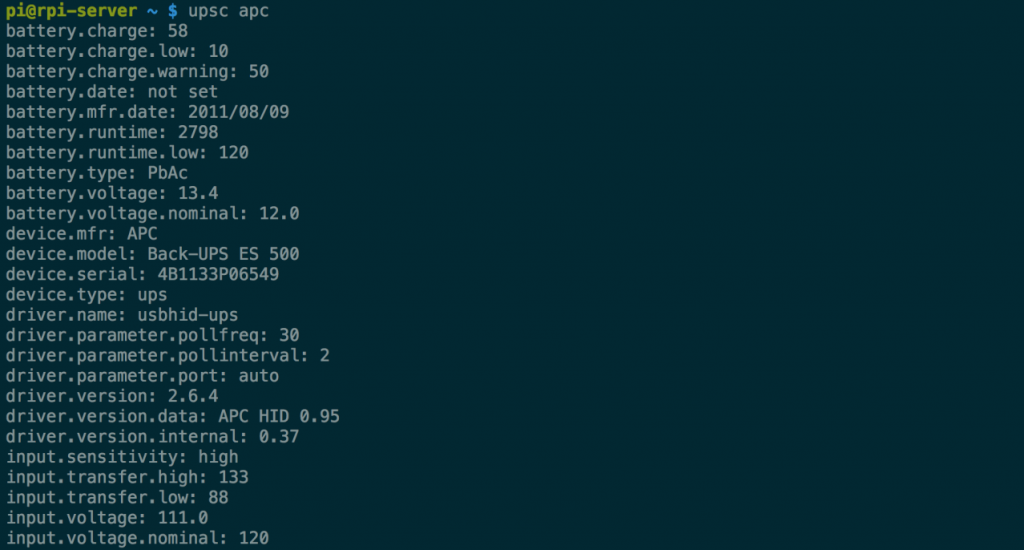
9、确定运行状态
#我们还可以用指令来确认这颗UPS可执行的管理命令。
upscmd -l apc
#或是取得UPS目前的系统状态。
upsc apc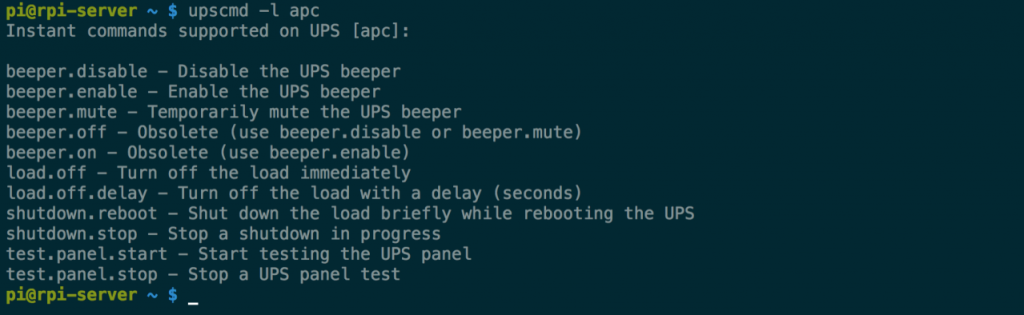
2、断电实测
我们试着将UPS 的市电插头拔掉,这时候在Shell 就会跳出「UPS on battery」的提示。

接着再把市电插头接回去之后,就会出现「UPS on line power」的提示。
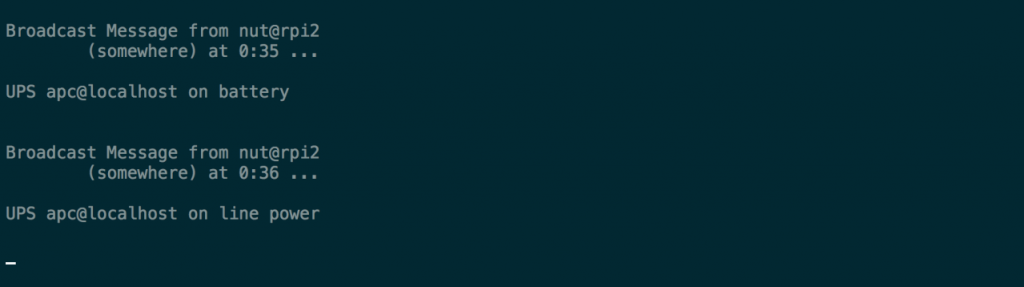
如果我们拔掉USB 连接线,则是出现「UPS is unavailable」的提示。

这些服务在运作过程中的错误日志,可以在/var/log/syslog里面找到。
cat /var/log/syslog | grep ups | less
3、异常排除
在启动UPS 的过程中,出现
Can't chdir to /var/run/nut
writepid: fopen /var/run/nut/usbhid-ups-apc.pid: Permission denied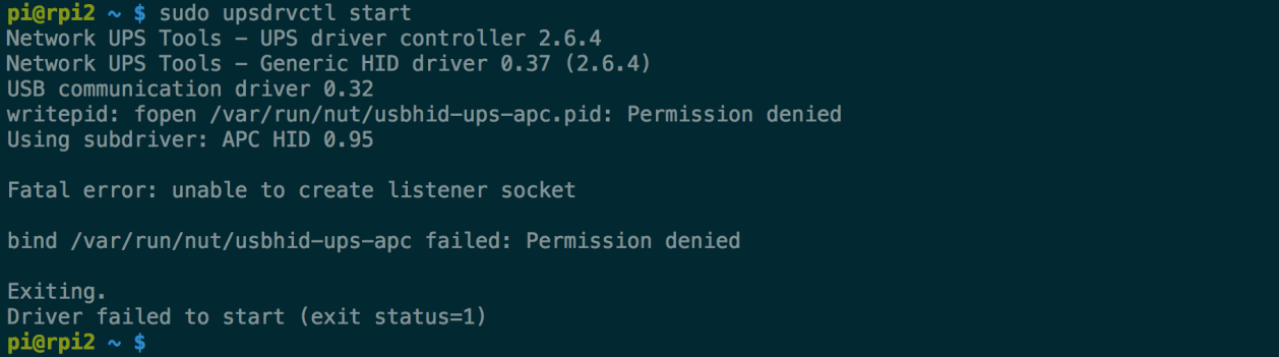

这是因为安装套件时,系统没有自动建立run-time的目录,手动建立即可。
sudo mkdir /var/run/nut
sudo chown root:nut /var/run/nut
sudo chmod 770 /var/run/nut
在启动nu-server 时出现「upsd failed」的错误。
可能是upsd.conf 设定错误、UPS 的USB 线没接、UPS 的电源没开… 等原因所致。
 孤斗 [gū dóu] 全作品采用知识共享署名-非商业性使用-禁止演绎 4.0 国际许可协议进行许可